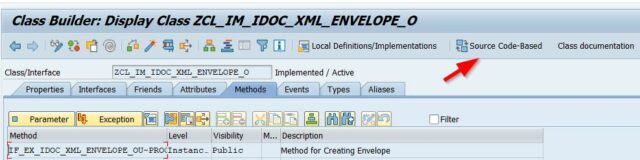
CLASS zcl_im_idoc_xml_envelope_o DEFINITION
PUBLIC
FINAL
CREATE PUBLIC .
PUBLIC SECTION.
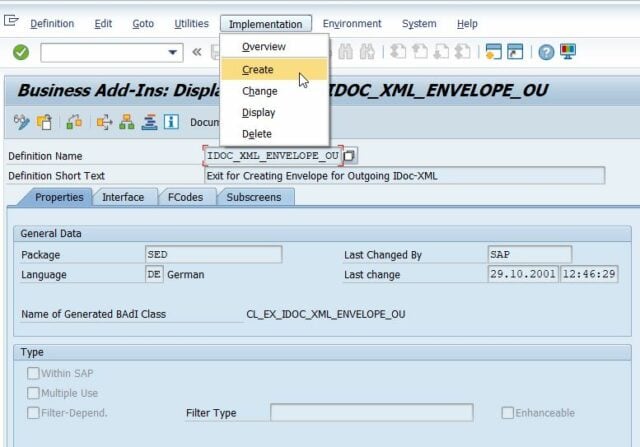
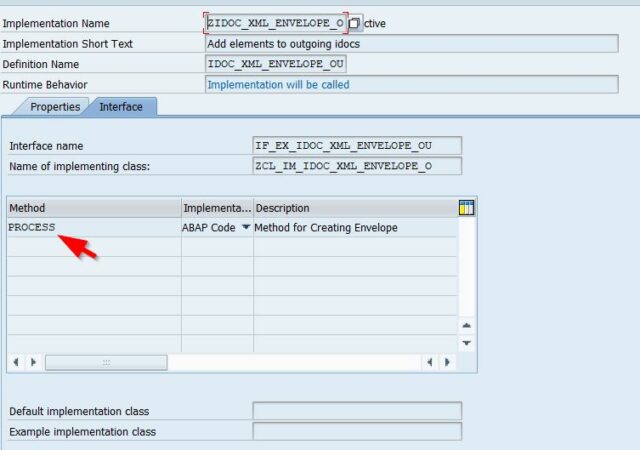
INTERFACES if_ex_idoc_xml_envelope_ou .
PROTECTED SECTION.
PRIVATE SECTION.
CONSTANTS gc_idoc_xml_envelope_ou_name TYPE string VALUE 'ZCLIMIDOCXMLENV_O' ##NO_TEXT.
CONSTANTS gc_idoc_xml_envelope_ou_rcvpor TYPE string VALUE '^.*PO.{0,1}_.*$' ##NO_TEXT.
CONSTANTS gc_idoc_xml_zidocenvelpout_v TYPE string VALUE 'ZIDOCENVELOPEOUT' ##NO_TEXT.
CONSTANTS gc_direct_outbound TYPE string VALUE '1' ##NO_TEXT.
METHODS create_message
IMPORTING
!iv_msgno TYPE edi_stamno
!iv_msgv1 TYPE any OPTIONAL
!iv_msgv2 TYPE any OPTIONAL
!iv_msgv3 TYPE any OPTIONAL
!iv_msgv4 TYPE any OPTIONAL
RETURNING
VALUE(rs_message) TYPE idocstatmp .
METHODS evaluate_xpath
IMPORTING
!idoc_string TYPE string
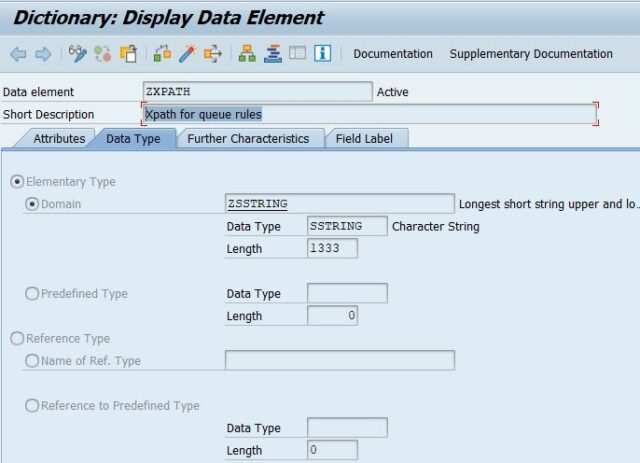
!xpath TYPE zxpath
RETURNING
VALUE(result) TYPE string .
METHODS getqueueid
IMPORTING
!control TYPE edidc
!xpath TYPE zxpath
!xpathresult TYPE zxpath
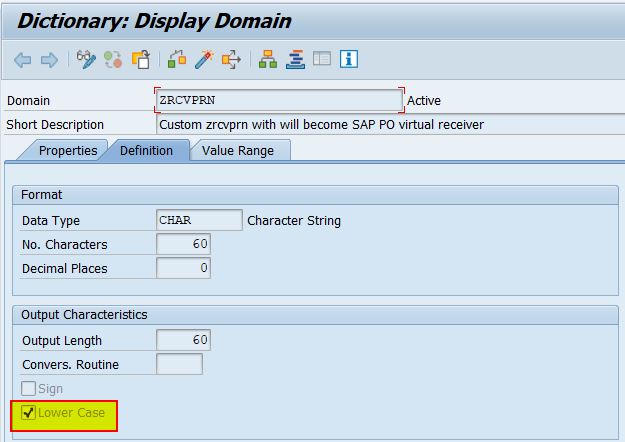
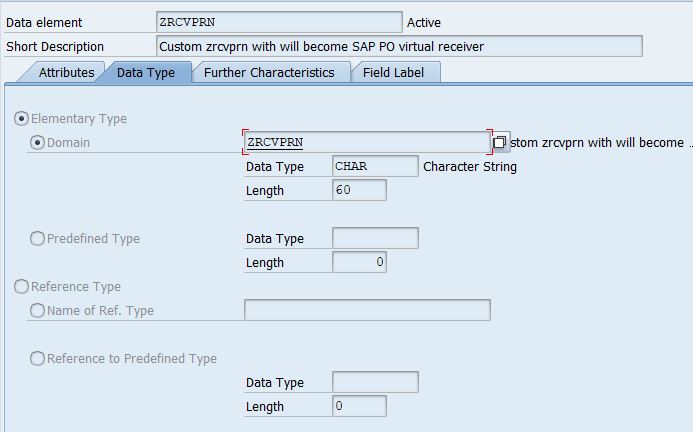
!zrcvprn TYPE zrcvprn
RETURNING
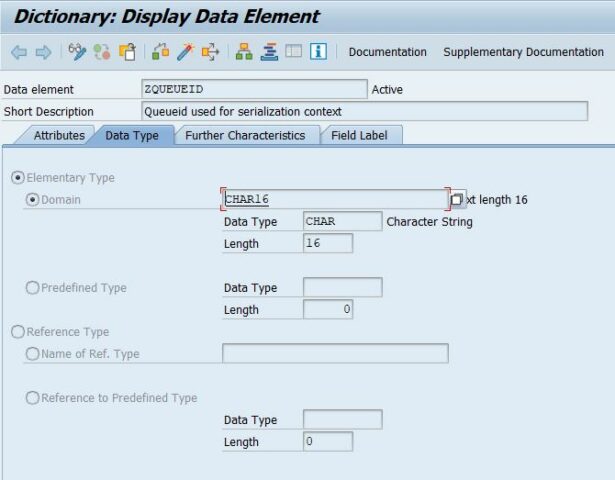
VALUE(queueid) TYPE char16 .
METHODS findenveloperecord
IMPORTING
!control TYPE edidc
!xpath TYPE zxpath
!xpathresult TYPE zxpath
!zrcvprn TYPE zrcvprn
RETURNING
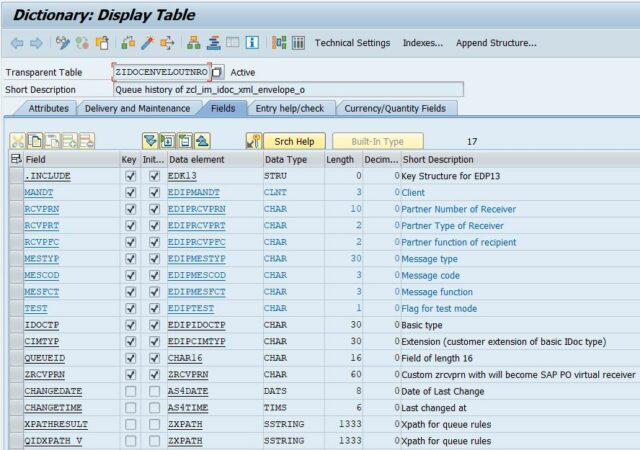
VALUE(env_record) TYPE zidocenveloutnro .
ENDCLASS.
CLASS ZCL_IM_IDOC_XML_ENVELOPE_O IMPLEMENTATION.
* <SIGNATURE>---------------------------------------------------------------------------------------+
* | Instance Private Method ZCL_IM_IDOC_XML_ENVELOPE_O->CREATE_MESSAGE
* +-------------------------------------------------------------------------------------------------+
* | [--->] IV_MSGNO TYPE EDI_STAMNO
* | [--->] IV_MSGV1 TYPE ANY(optional)
* | [--->] IV_MSGV2 TYPE ANY(optional)
* | [--->] IV_MSGV3 TYPE ANY(optional)
* | [--->] IV_MSGV4 TYPE ANY(optional)
* | [<-()] RS_MESSAGE TYPE IDOCSTATMP
* +--------------------------------------------------------------------------------------</SIGNATURE>
METHOD create_message.
* Check for consistency
IF iv_msgno IS INITIAL.
RAISE EXCEPTION TYPE cx_fatal_exception.
ENDIF.
CLEAR rs_message.
* Fill message structure
rs_message-stamid = gc_idoc_xml_envelope_ou_name.
rs_message-stamno = iv_msgno.
IF iv_msgv1 IS SUPPLIED.
rs_message-stapa1 = iv_msgv1.
ENDIF.
IF iv_msgv2 IS SUPPLIED.
rs_message-stapa2 = iv_msgv2.
ENDIF.
IF iv_msgv3 IS SUPPLIED.
rs_message-stapa3 = iv_msgv3.
ENDIF.
IF iv_msgv4 IS SUPPLIED.
rs_message-stapa4 = iv_msgv4.
ENDIF.
rs_message-repid = sy-repid.
ENDMETHOD.
* <SIGNATURE>---------------------------------------------------------------------------------------+
* | Instance Private Method ZCL_IM_IDOC_XML_ENVELOPE_O->EVALUATE_XPATH
* +-------------------------------------------------------------------------------------------------+
* | [--->] IDOC_STRING TYPE STRING
* | [--->] XPATH TYPE ZXPATH
* | [<-()] RESULT TYPE STRING
* +--------------------------------------------------------------------------------------</SIGNATURE>
METHOD evaluate_xpath.
DATA: separator(1) TYPE c VALUE '&',
full TYPE abap_bool.
* DESCRIBE FIELD result LENGTH DATA(clen) IN CHARACTER MODE. " no neeed to loop more than max length
DATA(xpp) = NEW cl_proxy_xpath( ).
xpp->set_source_string( idoc_string ).
xpp->run( expression = xpath ).
DATA(nodes) = xpp->get_nodes( ).
IF NOT nodes IS INITIAL.
DATA(node) = nodes->get_next( ).
WHILE node IS BOUND AND NOT node IS INITIAL AND NOT full = abap_true.
DATA(s) = node->get_value( ).
DATA(typ) = node->get_type( ).
CONCATENATE result s INTO result SEPARATED BY separator .
node = nodes->get_next( ).
ENDWHILE.
REPLACE REGEX '^' && separator && '+|' && separator && '+$' IN result WITH ''. " remove pipe at the end if there is one
ENDIF.
ENDMETHOD.
* <SIGNATURE>---------------------------------------------------------------------------------------+
* | Instance Private Method ZCL_IM_IDOC_XML_ENVELOPE_O->FINDENVELOPERECORD
* +-------------------------------------------------------------------------------------------------+
* | [--->] CONTROL TYPE EDIDC
* | [--->] XPATH TYPE ZXPATH
* | [--->] XPATHRESULT TYPE ZXPATH
* | [--->] ZRCVPRN TYPE ZRCVPRN
* | [<-()] ENV_RECORD TYPE ZIDOCENVELOUTNRO
* +--------------------------------------------------------------------------------------</SIGNATURE>
METHOD findenveloperecord.
SELECT * FROM zidocenveloutnro
WHERE rcvprt = @control-rcvprt
AND rcvprn = @control-rcvprn
AND rcvpfc = @control-rcvpfc
AND mestyp = @control-mestyp
AND mescod = @control-mescod
AND mesfct = @control-mesfct
AND test = @control-test
AND idoctp = @control-idoctp
AND cimtyp = @control-cimtyp
AND xpathresult = @xpathresult
AND zrcvprn = @zrcvprn
AND qidxpath_v = @xpath
INTO @env_record.
ENDSELECT.
ENDMETHOD.
* <SIGNATURE>---------------------------------------------------------------------------------------+
* | Instance Private Method ZCL_IM_IDOC_XML_ENVELOPE_O->GETQUEUEID
* +-------------------------------------------------------------------------------------------------+
* | [--->] CONTROL TYPE EDIDC
* | [--->] XPATH TYPE ZXPATH
* | [--->] XPATHRESULT TYPE ZXPATH
* | [--->] ZRCVPRN TYPE ZRCVPRN
* | [<-()] QUEUEID TYPE CHAR16
* +--------------------------------------------------------------------------------------</SIGNATURE>
METHOD getqueueid.
DATA: enqueued TYPE abap_bool,
wa_record TYPE zidocenveloutnro,
rc TYPE inri-returncode,
loops TYPE n VALUE 1,
maxloops TYPE i VALUE 10.
TRY.
* Query to get the unique (single) record if same was already processed.
wa_record = me->findenveloperecord( control = control xpath = xpath xpathresult = xpathresult zrcvprn = zrcvprn ).
WHILE NOT enqueued EQ abap_true AND loops < maxloops AND wa_record IS INITIAL. " enqueue table for insert
loops = loops + 1. " avoid endless loop
* Enqueue for insert, if new
CALL FUNCTION 'ENQUEUE_E_TABLE'
EXPORTING
mode_rstable = 'E'
_wait = 'X'
tabname = 'ZIDOCENVELOUTNRO'.
IF sy-subrc = 0.
enqueued = abap_true.
ELSE.
IF loops >= maxloops .
RAISE EXCEPTION TYPE cx_abap_pragma_enqueue.
ENDIF.
WAIT UP TO 2 SECONDS.
ENDIF.
* Check again to make sure no insert happened during wait for enqueue
wa_record = me->findenveloperecord( control = control xpath = xpath xpathresult = xpathresult zrcvprn = zrcvprn ).
IF enqueued EQ abap_true AND wa_record IS INITIAL.
" should only be reached if enqued
IF xpathresult IS NOT INITIAL. " only if serialization is required
CALL FUNCTION 'NUMBER_GET_NEXT'
EXPORTING
nr_range_nr = 'Z1'
object = 'ZQUEUEID'
IMPORTING
number = queueid
returncode = rc.
IF sy-subrc <> 0 OR rc <> 0.
RAISE EXCEPTION TYPE cx_abap_load_error.
ENDIF.
ENDIF.
wa_record = VALUE #( BASE CORRESPONDING #( control ) qidxpath_v = xpath xpathresult = xpathresult changedate = sy-datum changetime = sy-uzeit queueid = queueid zrcvprn = zrcvprn ).
INSERT INTO zidocenveloutnro VALUES wa_record.
COMMIT WORK.
ENDIF.
*end of enque, if new
ENDWHILE.
* return queueid (also empty/initial ones) if successfully retrieved otherwise exception
IF wa_record IS NOT INITIAL.
queueid = wa_record-queueid.
ELSE.
RAISE EXCEPTION TYPE cx_abap_load_error.
ENDIF.
CATCH cx_root.
RAISE EXCEPTION TYPE cx_abap_load_error.
CLEANUP.
IF enqueued EQ abap_true.
CALL FUNCTION 'DEQUEUE_E_TABLE'
EXPORTING
mode_rstable = 'E'
tabname = 'ZIDOCENVELOUTNRO'.
IF sy-subrc <> 0.
RAISE EXCEPTION TYPE cx_abap_load_error.
ENDIF.
ENDIF.
ENDTRY.
ENDMETHOD.
* <SIGNATURE>---------------------------------------------------------------------------------------+
* | Instance Public Method ZCL_IM_IDOC_XML_ENVELOPE_O->IF_EX_IDOC_XML_ENVELOPE_OU~PROCESS
* +-------------------------------------------------------------------------------------------------+
* | [--->] IDOC_XML TYPE XSTRING
* | [--->] CONTROL TYPE EDIDC
* | [<---] OUTBOUND_XML TYPE XSTRING
* | [<---] ERROR TYPE CHAR1
* | [<---] PROTOCOL TYPE IDOCSTATMP
* +--------------------------------------------------------------------------------------</SIGNATURE>
METHOD if_ex_idoc_xml_envelope_ou~process.
TYPE-POOLS: ixml.
DATA: lo_stream_factory TYPE REF TO if_ixml_stream_factory,
lo_input_stream TYPE REF TO if_ixml_istream,
lo_output_stream TYPE REF TO if_ixml_ostream,
lo_document TYPE REF TO if_ixml_document,
lo_parser TYPE REF TO if_ixml_parser,
lo_parse_error TYPE REF TO if_ixml_parse_error,
lo_renderer TYPE REF TO if_ixml_renderer,
lo_ixml TYPE REF TO if_ixml.
DATA:
lv_idocout_s TYPE string,
errorcount TYPE integer VALUE 0.
* Reset exporting parameters
CLEAR outbound_xml.
CLEAR error.
CLEAR protocol.
*+-------------------------------------------------------------------------------------------------+
* Do initial checks and return if they are not fullfilled with original payload
*+-------------------------------------------------------------------------------------------------+
outbound_xml = idoc_xml.
IF idoc_xml IS INITIAL.
RETURN. " Exit anyway
ENDIF.
* Check the port to be relevant
DATA: portmatch TYPE match_result.
FIND FIRST OCCURRENCE OF REGEX gc_idoc_xml_envelope_ou_rcvpor IN control-rcvpor RESULTS portmatch.
IF portmatch IS INITIAL. " IDOC receiver port is not a *PO[x]_ destiantion
RETURN.
ENDIF.
IF control-direct <> gc_direct_outbound. " Direction is not "1 - Outbound"
RETURN.
ENDIF.
TRY.
* +-------------------------------------------------------------------------------------------------+
* | Convert xstring to string, default UTF-8 encoding
* +-------------------------------------------------------------------------------------------------+
DATA(idoc_string) = cl_abap_codepage=>convert_from( source = idoc_xml ).
* +-------------------------------------------------------------------------------------------------+
* | Save for later and now remove XML declaration from incoming XML
* +-------------------------------------------------------------------------------------------------+
DATA: matches TYPE match_result,
xml_declaration TYPE string.
FIND FIRST OCCURRENCE OF REGEX '<\?xml.*\?>' IN idoc_string RESULTS matches.
xml_declaration = idoc_string+matches-offset(matches-length).
REPLACE REGEX '<\?xml.*\?>' IN idoc_string WITH ''.
* +-------------------------------------------------------------------------------------------------+
* | Retrieve UUID as sysuuid_x
* +-------------------------------------------------------------------------------------------------+
DATA: uuid TYPE sysuuid_x.
CALL FUNCTION 'SYSTEM_UUID_CREATE'
IMPORTING
uuid = uuid.
* +-------------------------------------------------------------------------------------------------+
* | Format Message ID with hyphens as string
* +-------------------------------------------------------------------------------------------------+
DATA(msgid) = cl_soap_wsrmb_helper=>convert_uuid_raw_to_hyphened( uuid ).
* +-------------------------------------------------------------------------------------------------+
* | Get UTC timestamp
* +-------------------------------------------------------------------------------------------------+
DATA: lv_utc TYPE timestamp.
cl_abap_tstmp=>systemtstmp_syst2utc(
EXPORTING
syst_date = sy-datum
syst_time = sy-uzeit
IMPORTING
utc_tstmp = lv_utc ).
errorcount = errorcount + sy-subrc.
* +-------------------------------------------------------------------------------------------------+
* | Convert UTC timestamp into ISO format as string
* +-------------------------------------------------------------------------------------------------+
DATA: ts TYPE string.
ts = cl_xlf_date_time=>create( timestamp = lv_utc ).
* +-------------------------------------------------------------------------------------------------+
* | Retrieve business system name from SLD for sender service
* +-------------------------------------------------------------------------------------------------+
DATA: bs_name TYPE text60,
bs_capt TYPE string,
bs_role TYPE lcr_bs_role.
CALL FUNCTION 'LCR_GET_OWN_BUSINESS_SYSTEM'
EXPORTING
bypassing_cache = ' '
read_from_cache = ' '
update_cache_entry_timestamp = ' '
IMPORTING
bs_key_name = bs_name
bs_caption = bs_capt
bs_role = bs_role.
errorcount = errorcount + sy-subrc.
* +-------------------------------------------------------------------------------------------------+
* | Get data from the customizing table
* +-------------------------------------------------------------------------------------------------+
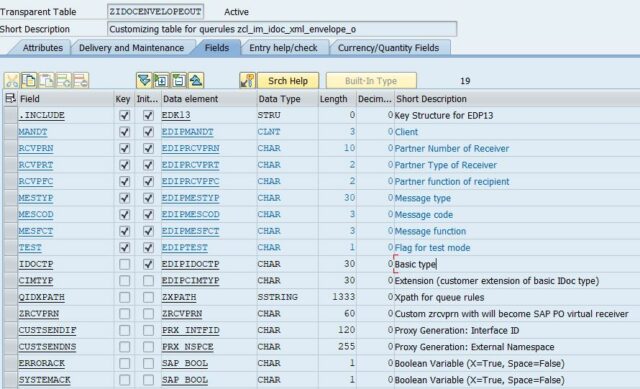
SELECT SINGLE * FROM zidocenvelopeout
WHERE rcvprt = @control-rcvprt
AND rcvprn = @control-rcvprn
AND rcvpfc = @control-rcvpfc
AND mestyp = @control-mestyp
AND mescod = @control-mescod
AND mesfct = @control-mesfct
AND idoctp = @control-idoctp
AND cimtyp = @control-cimtyp INTO @DATA(custv).
* +-------------------------------------------------------------------------------------------------+
* | Do the mapping of RCVPRN, which might be required for party due to SAP PO not accepting numbers
* +-------------------------------------------------------------------------------------------------+
DATA: rcvprn TYPE zrcvprn.
IF custv-zrcvprn IS NOT INITIAL.
rcvprn = custv-zrcvprn.
ELSE.
rcvprn = control-rcvprn.
ENDIF.
* +-------------------------------------------------------------------------------------------------+
* | Run the Xpath evaluation which is required to set serialization context (QueueId) in SAP PO
* +-------------------------------------------------------------------------------------------------+
DATA: xpathresult TYPE zxpath .
IF custv-qidxpath IS NOT INITIAL.
IF custv-qidxpath(1) = ''''.
xpathresult = custv-qidxpath.
REPLACE ALL OCCURRENCES OF '''' IN xpathresult WITH ''.
ELSE.
xpathresult = me->evaluate_xpath( idoc_string = idoc_string xpath = custv-qidxpath ).
ENDIF.
IF xpathresult IS INITIAL.
protocol = create_message(
iv_msgno = '006'
iv_msgv1 = 'Xpath found no value'
iv_msgv2 = 'Badi: ZCL_IM_IDOC_XML_ENVELOPE_O').
error = abap_true.
RETURN.
ENDIF.
ENDIF.
* +-------------------------------------------------------------------------------------------------+
* | Data preparation steps
* +-------------------------------------------------------------------------------------------------+
DATA: systemack TYPE string,
errorack TYPE string,
defaultif TYPE string,
queueid TYPE char16.
defaultif = control-mestyp && '.' && control-idoctp && '.' && control-cimtyp. "In case no custom Idoc interface required
REPLACE REGEX '\.$' IN defaultif WITH '' . " remove dot at the end in case no cimtype
IF custv-systemack = abap_false. " convert to xsd:boolean
systemack = 'false'.
ELSE.
systemack = 'true'.
ENDIF.
IF custv-errorack = abap_false.
errorack = 'false'.
ELSE.
errorack = 'true'.
ENDIF.
" will also be called in case no queuueid is required for join of view ZIDOCENVELPOUT_V
queueid = me->getqueueid( control = control xpath = custv-qidxpath xpathresult = xpathresult zrcvprn = custv-zrcvprn ).
* +-------------------------------------------------------------------------------------------------+
* | Add SAP PO SOAP envelope around xml to fill xi protocol parameters dnyamically
* +-------------------------------------------------------------------------------------------------+
CONCATENATE xml_declaration
'<SOAP:Envelope xmlns:SOAP="http://schemas.xmlsoap.org/soap/envelope/">'
'<SOAP:Header>'
'<sap:Main xmlns:sap="http://sap.com/xi/XI/Message/30" versionMajor="3" versionMinor="1" SOAP:mustUnderstand="1">'
'<sap:MessageClass>ApplicationMessage</sap:MessageClass>'
'<sap:ProcessingMode>asynchronous</sap:ProcessingMode>'
'<sap:MessageId>' msgid '</sap:MessageId>'
'<sap:TimeSent>' ts '</sap:TimeSent>'
'<sap:Sender>'
'<sap:Party agency="http://sap.com/xi/XI" scheme="XIParty"/>'
'<sap:Service>' bs_name '</sap:Service>'
'</sap:Sender>'
'<sap:Receiver>' INTO lv_idocout_s.
CASE control-rcvprt .
WHEN 'LS'.
CONCATENATE lv_idocout_s
'<sap:Party agency="http://sap.com/xi/XI" scheme="XIParty"/>'
'<sap:Service>' rcvprn '</sap:Service>' INTO lv_idocout_s .
WHEN OTHERS.
CONCATENATE lv_idocout_s
'<sap:Party agency="http://sap.com/xi/XI" scheme="XIParty">' rcvprn '</sap:Party>'
'<sap:Service></sap:Service>' INTO lv_idocout_s .
ENDCASE.
CONCATENATE lv_idocout_s
'</sap:Receiver>' INTO lv_idocout_s .
CASE custv-custsendns .
WHEN ' '.
CONCATENATE lv_idocout_s
'<sap:Interface namespace="urn:sap-com:document:sap:idoc:messages" >' INTO lv_idocout_s .
WHEN OTHERS.
CONCATENATE lv_idocout_s
'<sap:Interface namespace="' custv-custsendns '" >' INTO lv_idocout_s .
ENDCASE.
CASE custv-custsendif .
WHEN ' '.
CONCATENATE lv_idocout_s defaultif INTO lv_idocout_s .
WHEN OTHERS.
CONCATENATE lv_idocout_s custv-custsendif INTO lv_idocout_s .
ENDCASE.
CONCATENATE lv_idocout_s
'</sap:Interface>'
'</sap:Main>'
'<sap:ReliableMessaging xmlns:sap="http://sap.com/xi/XI/Message/30" SOAP:mustUnderstand="1" SystemAckRequested="' systemack '" SystemErrorAckRequested="' errorack '" >' INTO lv_idocout_s .
CASE custv-qidxpath .
WHEN ' ' .
CONCATENATE lv_idocout_s
'<sap:QualityOfService>ExactlyOnce</sap:QualityOfService>' INTO lv_idocout_s .
WHEN OTHERS.
CONCATENATE lv_idocout_s
'<sap:QualityOfService>ExactlyOnceInOrder</sap:QualityOfService>'
'<sap:QueueId>' queueid '</sap:QueueId>' INTO lv_idocout_s .
ENDCASE.
CONCATENATE lv_idocout_s
'</sap:ReliableMessaging>'
'<sap:DynamicConfiguration xmlns:sap="http://sap.com/xi/XI/Message/30" SOAP:mustUnderstand="1">'
'<sap:Record namespace="http://sap.com/xi/XI/System/IDoc_AAE" name="RCVPRN">' control-rcvprn '</sap:Record>'
'<sap:Record namespace="http://sap.com/xi/XI/System/IDoc_AAE" name="DOCNUMS">' control-docnum '</sap:Record>'
'<sap:Record namespace="http://sap.com/xi/XI/System/IDoc_AAE" name="AckData">' control-docnum ';' control-rcvprn '</sap:Record>'
'</sap:DynamicConfiguration>'
'<sap:HopList xmlns:sap="http://sap.com/xi/XI/Message/30" SOAP:mustUnderstand="1">'
'<sap:Hop timeStamp="' ts '" wasRead="false">'
'<sap:Engine type="AE">af.pot.pot</sap:Engine>'
'<sap:Adapter namespace="http://sap.com/xi/XI/System">IDoc_AAE</sap:Adapter>'
'<sap:MessageId>' msgid '</sap:MessageId>'
'<sap:Info>localejbs/IDocAckBean</sap:Info>'
'</sap:Hop>'
'</sap:HopList>'
'</SOAP:Header>'
'<SOAP:Body>'
idoc_string
' </SOAP:Body>'
'</SOAP:Envelope>'
INTO lv_idocout_s.
* +-------------------------------------------------------------------------------------------------+
* | Prepare output and convert from string to xstring, default UTF-8
* +-------------------------------------------------------------------------------------------------+
CLEAR outbound_xml.
outbound_xml = cl_abap_codepage=>convert_to( source = lv_idocout_s ).
* +-------------------------------------------------------------------------------------------------+
* | Error Handling
* +-------------------------------------------------------------------------------------------------+
IF errorcount <> 0.
RAISE EXCEPTION TYPE cx_abap_load_error.
ENDIF.
CATCH cx_root INTO DATA(e_text).
protocol = create_message(
iv_msgno = '006'
iv_msgv1 = 'ZCL_IM_IDOC_XML_ENVELOPE_O' ).
error = abap_true.
RETURN.
ENDTRY.
ENDMETHOD.
ENDCLASS.