2024-03-27

How to successfully migrate data between different databases

Data migration made easy with SQL Workbench/J

Have you ever faced the challenge of migrating data from one database to another, perhaps even between different DB providers? Whether you are switching from an on-premise Netweaver Portal solution to SAP BTP, from a HANA DB to PostgreSQL on SAP BTP for cost savings, changing the provider of the database or moving to a new database management system – data migration is often essential, but can also be very complex.

DB Migration Challenge

Why use SQL Workbench/J?

The free tool support provided by SQL Workbench/J can provide a solution to such challenges. As part of our InnovateSAP initiative, we rely on SQL Workbench/J to solve migration challenges.

The required connection to source and target databases as well as the maintenance of predefined and additional JDBC drivers (e.g. for HANA) is relatively uncomplicated. A HANA JDBC driver has been created here:
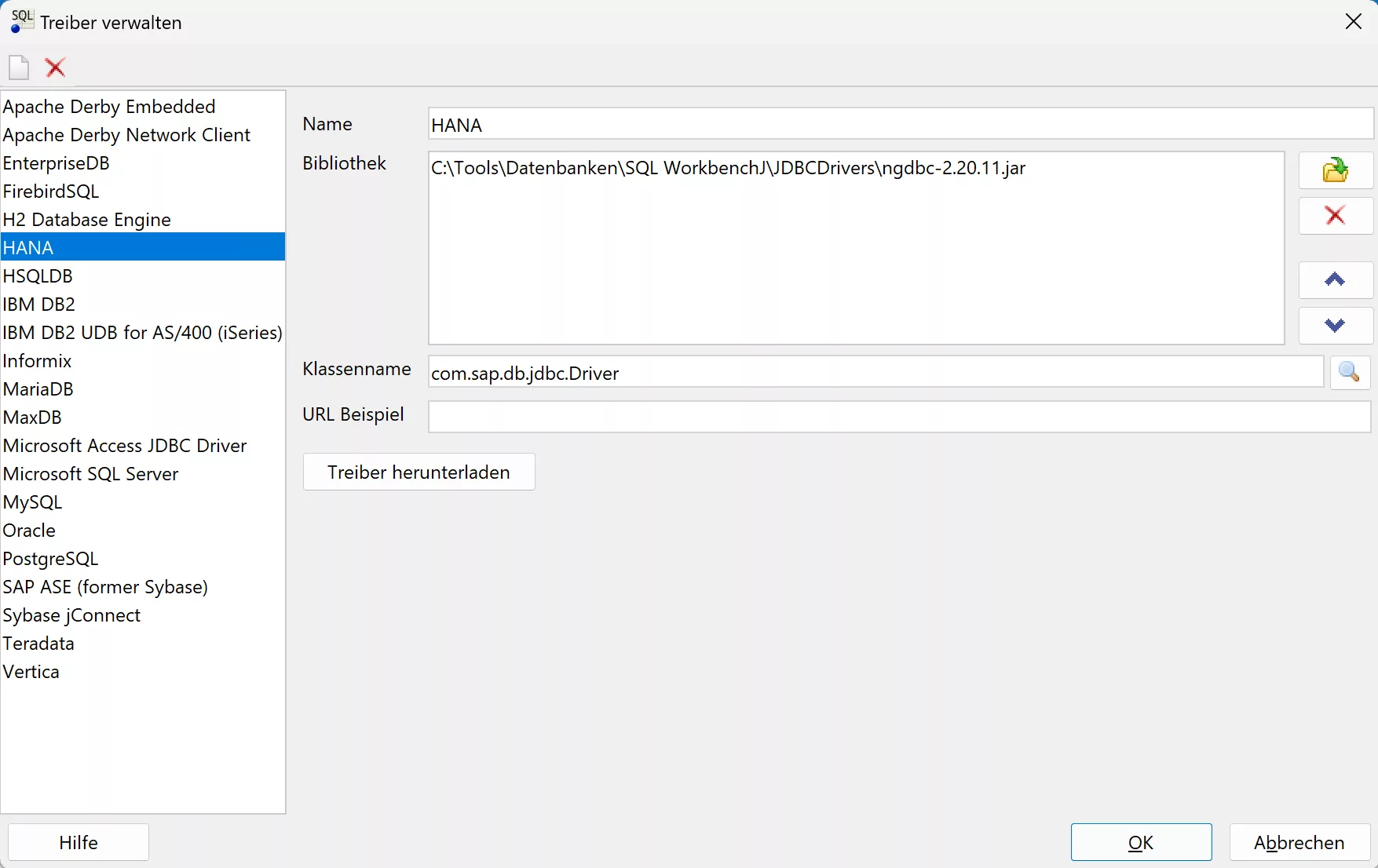
Manage Drivers

Here is a PostgreSQL connection (which uses an SSH tunnel to SAP BTP):
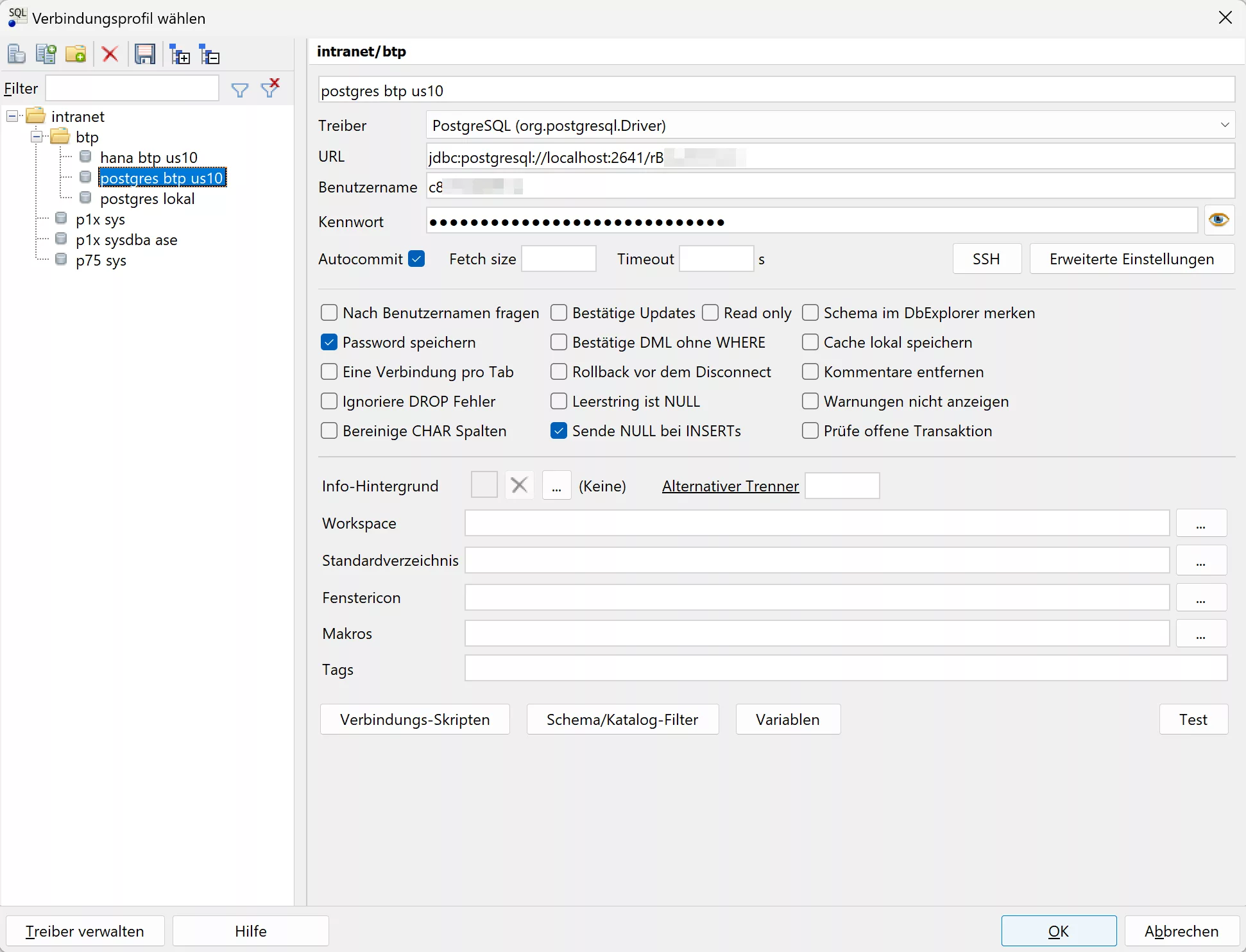
Select Connection Profile

SQL Workbench/J supports a wide range of databases, including (sometimes more, sometimes less officially): Oracle, MySQL, PostgreSQL, SQL Server, DB2, Sybase, MS Access, Firebird, Apache Derby, HSQLDB, Informix, InterSystems Caché, MariaDB, Netezza, Pervasive PSQL, SQLite, Teradata, Amazon Redshift, Vertica, Greenplum, SAP MaxDB, Snowflake, Amazon Athena, Apache Hive, Google BigQuery, Presto, SAP HANA. This broad support makes it possible to handle virtually any data migration project in the SQL area.

Common migration hurdles

For example, one of the common challenges is blob fields (binary data of almost unlimited size) that cannot be exported as CSV, Excel or JSON with Oracle’s Oracle SQL Developer, for example. These files could become extremely large due to binary data.

In these cases, a manual export and import of files, which is already very labor-intensive, is not only error-prone, time-consuming and difficult to reproduce – it is simply impossible.

Creating Data Structures

Depending on the application, the creation of tables, indexes and, if necessary, functions can be done either via SQL directly or through your development tools. Artificial intelligence can be of particular help here, for example when creating the new data model based on the old data structure or adapting the Create SQL scripts to a new manufacturer or namespace. ChatGPT 3.5 is already a good aid here.

Implementation

With SQL Workbench/ J’s Data Pumper , you can perform data migration efficiently. Once the connections to the source and target databases have been established, the migration can be controlled with a comprehensive set of options:

  • Selecting the Data Source (Table or SQL Select) and Destination – Here using SQL Source instead of a table:
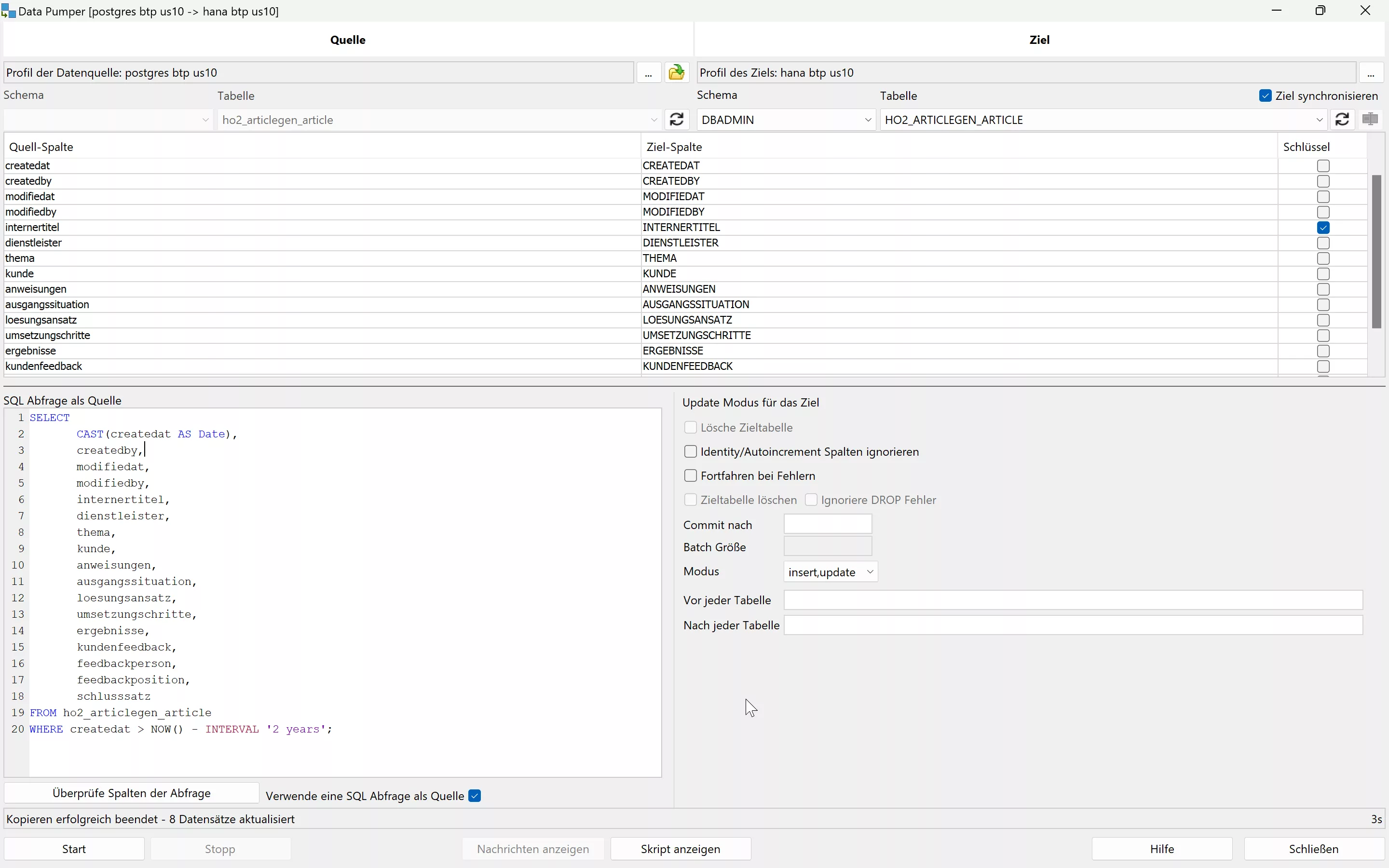
  • Manual assignment of table columns, if necessary
  • Specifying the Mode to Control Update/Replace Existing Values in the Target
  • Setting Batch Size for Optimized Performance

A key aspect of this process is the choice of mode to determine how or if existing values should be replaced. An incorrect selection will lead to errors at runtime. Possible modes are:

  • Insert
  • Update
  • Insert+Update
  • Update+Insert
  • Upsert

For performance reasons and to avoid errors, it is advisable to choose the mode that allows successful operations more frequently, i.e. insert on non-existent keys or upsert to update existing values or add new records. To ensure optimal performance, it is recommended to insert or update records in batches, typically in sizes of 100 records per batch, to avoid excessive commits.
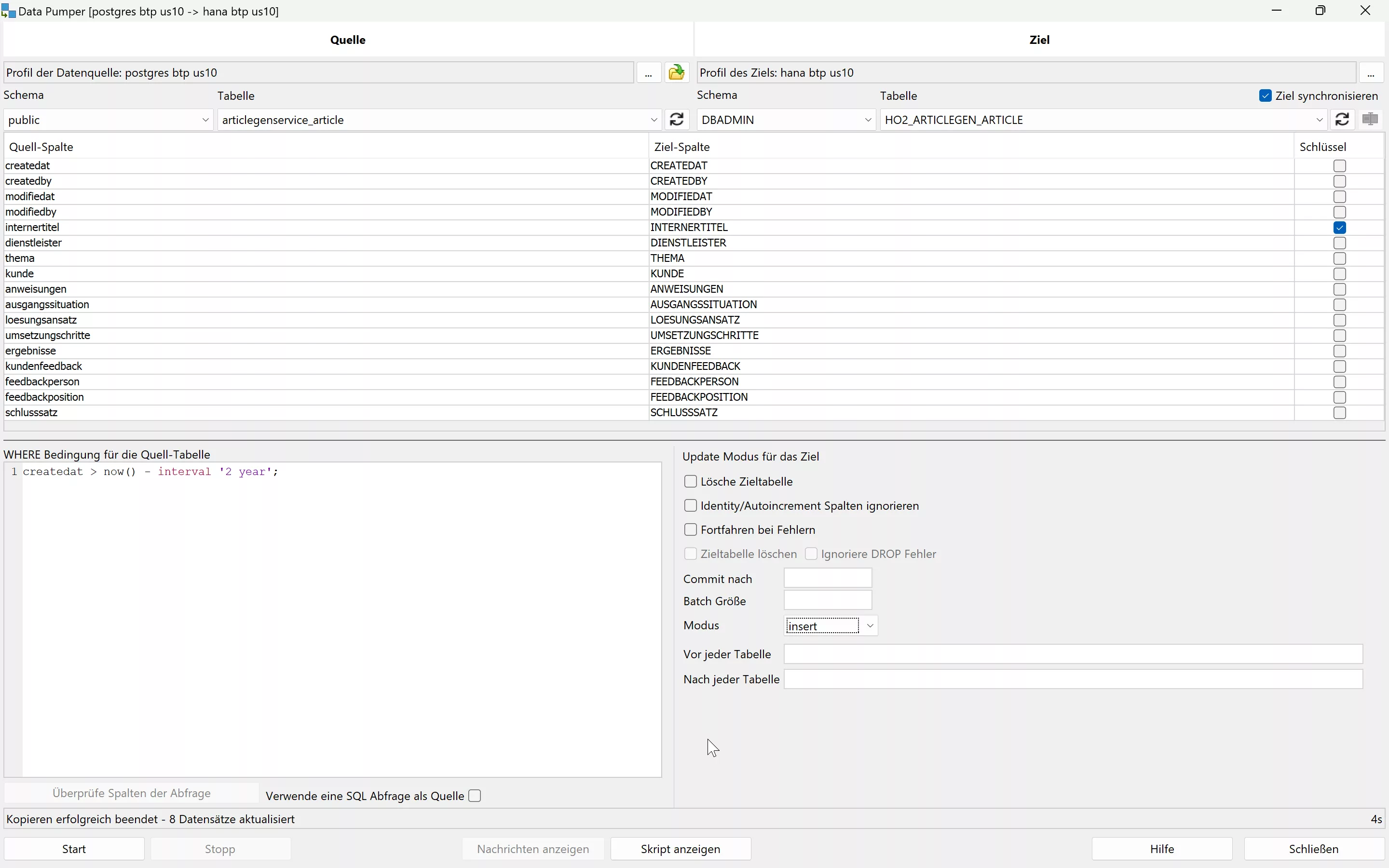
Transfer with Where
With the support of SQL Workbench/J, data can be migrated effectively and quickly.

Exportable script

To perform a data migration as scheduled, SQL Workbench/J allows you to export the Data Pumper function as a script. In this way, you can create an executable script step by step with one WB Copy command per table. The migration is then carried out at the push of a button. If necessary, normal SQL commands can also be used in the script.

Here is an example where a table is migrated from Oracle to SAP ASE (formerly Sybase SQL Server) using a SQL query and default values are set.

WbCopy -sourceProfile='p75 sys'
       -sourceGroup=intranet
       -targetProfile='p1x sysdba ase'
       -targetGroup=intranet
       -targetTable=SAPSR3DB.TCM_EMPLOYEE_DATE
       -sourceQuery="SELECT ID,
       CONTACT_INTERN,
       IS_BACKOFFICE,
       NVL(HIRE_DATE, TO_DATE('2099-01-01','YYYY-MM-DD')) as HIRE_DATE,
       NVL(FIRE_DATE, TO_DATE('2099-01-01','YYYY-MM-DD')) as FIRE_DATE,
       VACATION_DAYS
FROM SAPSR3DB.TCM_EMPLOYEE_DATE

"
       -ignoreIdentityColumns=false
       -deleteTarget=true
       -continueOnError=false
       -batchSize=100
;

Such a script makes data migration between different database providers simple and straightforward.

DB Migration Successfully Conducted

Contact

We will be happy to answer any further questions you may have about data migration and the InnovateSAP initiative. If you have any challenges or specific requests, do not hesitate to contact us. Together we will find a solution!

2024-03-22

External access to your PostgreSQL database on SAP BTP? HO2 shows how it’s done

External Access to PostgreSQL Database Instances on SAP BTP with HO2

Are you ready to take your database management to the next level? As part of the InnovateSAP initiative, we want to help you effectively overcome the challenges of accessing PostgreSQL database instances on SAP BTP.

Starting situation

As a database specialist or software developer, it is quite common to have direct access to the databases. Even if this does not seem absolutely necessary, for example, in the context of SAP CAP application development .

However, access can be helpful or crucial in many situations and also in day-to-day operations. Think of areas such as data migration, debugging, monitoring, and performance optimization.

Access to PostgreSQL database instances was a significant hurdle here. By default, SAP does not provide an application to manage PostgreSQL instances. The ability to view tables, data, and other objects and, if necessary, modify them was limited compared to the options available with HANA-DB on SAP BTP. This limitation required a solution to improve efficiency and functionality.

PostgreSQL inaccessible on the BTP

Approach

To ensure the security and accessibility of the database for developers and database specialists, our team decided to set up an SSH tunnel . By deploying a small application, such a connection was successfully established. As a result, we were able to implement an efficient and secure solution for external database access.

Howto: SAP BTP PostgreSQL Database Connection to pgAdmin with SSH Tunnel

This guide provides you with an in-depth guide to establish a secure and direct connection between your SAP BTP hosted PostgreSQL database and the pgAdmin application on your local machine.

Preconditions:

  • SAP BTP Account
  • pgAdmin installed on your computer
  • Authorization and quota to create a PostgreSQL-DB instance, to create applications for deploys and bindings
  • Cloud Foundry CLI installed

Steps for external access:

  1. Create a PostgreSQL database instance on SAP BTP.
  2. Create a new service key for external access. The key data is required for the tunnel and the admin software
  3. Log in to Cloud Foundry using the command line.
  4. Deployment of the sshenable app.
  5. Bind the PostgreSQL database to the app.
  6. Open an SSH tunnel for local database access.
  7. Configuration of pgAdmin to access the SAP BTP PostgreSQL database.

1.Create PostgreSQL Database Instance on SAP BTP

If all requirements are met, only the name of the instance needs to be assigned. You should avoid unusual signs:

Create postgreSQL instance

2.Create a new service key for external access

The data is required for the tunnel and the DB admin software

3. To log in to the Cloudfoundry:

From now on we need the command line

cf login --sso

or

cf api API_ENDPOINT 
cf login

A possible API endpoint is: https://api.cf.us10-001.hana.ondemand.com. The URL depends on your subaccount.

4. To deploy the “SSH Enable” APP:

git clone https://github.com/alimert801/cf-sample-python-app.git

optionally change the app name(APP_NAME) from myapp to sshenable in the manifest.yml

In the root folder of the app, run (replace APP_NAME):

cf push APP_NAME

Share the app as an SSH endpoint and restart:

cf enable-ssh APP_NAME
cf restage APP_NAME

5. Bind the PostgreSQL database to the app

binding of the DB to the APP

6. To create the SSH tunnel:

cf ssh -L localhost:2641:REMOTEHOST:REMOTEPORT APP_NAME -N 

In this command, the (arbitrarily chosen) local port 2641 is forwarded to the PostgreSQL database port of the SAP BTP, which allows pgAdmin to access your SAP BTP database as if it were local. REMOTEHOST and REMOTEPORT can be found in the service key created at the beginning as host and port

7. Configuring pgAdmin:

Four values are required from the service key:

  1. dbname
  2. Password
  3. port
  4. username

It is not necessary to take care of the SSH tab!

Architecture:

This architecture enables seamless communication and secure data access between your on-premises work environment and SAP BTP. By binding the database to your cloud application and using an SSH tunnel to route the ports, you create a secure and efficient data bridge directly in pgAdmin on your local machine.

Results

By implementing this solution, access to the PostgreSQL database instances is enabled. Tools such as pgAdmin and SQL Workbench/J can now be used to manage the database efficiently. This improvement has brought significant improvements in areas such as data migration, debugging, monitoring, and performance optimization.

Developer access to PostgreSQL

Closing remarks

The HO2 as part of the InnovateSAP initiative has once again demonstrated the results that can be achieved through technical expertise. With this enabled database accessibility, we are setting new standards in efficiency and productivity.

If you have any questions about the implementation or other services, do not hesitate to contact us. We are ready to tackle any challenge and seize every opportunity to innovate.

← Zur Startseite